|
Savoy ActiveX Control
|
|
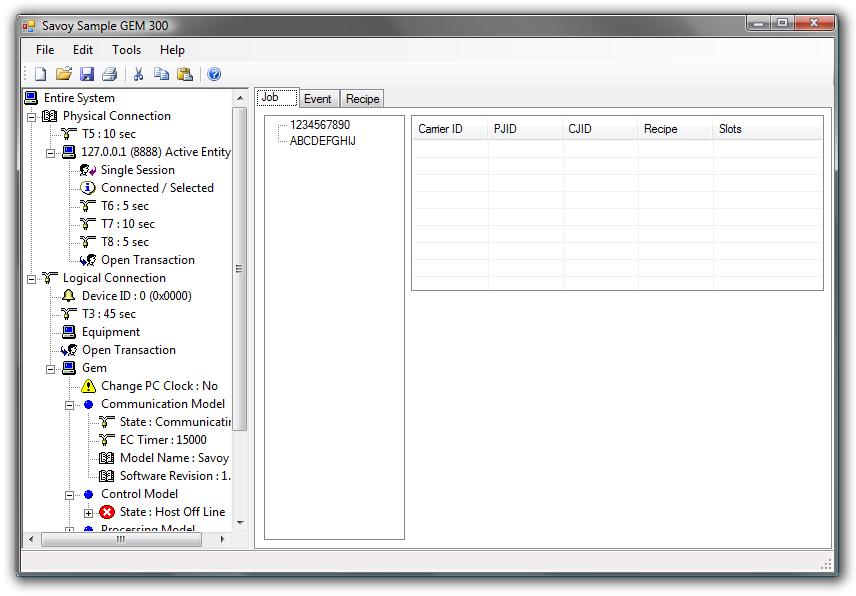
This sample will explain how to implement GEM 300 system with Savoy.

|
|
|
 Constant Variables Definition
Define constant variable names using "Enum" expression.
VIDs, CEIDs and ALID are used in this sample.
-
VID
|
|
|
Protected Enum VIDEnum
VIDECTimer = 201
VIDTimeFormat
VIDControlState
' Load port state
VIDLoadPortState1 = 301
VIDLoadPortState2
' Access mode
VIDAccessMode1 = 311
VIDAccessMode2
' Slot map
VIDSlotMap1 = 321
VIDSlotMap2
' Carrier ID
VIDCarrierID1 = 331
VIDCarrierID2
End Enum
|
-
CEID
|
|
|
Protected Enum CEIDEnum
CEIDOffline = 51
CEIDOnlineLocal
CEIDOnlineRemote
CEIDPJState = 60
CEIDCJState = 70
CEIDWaferProcessData = 80
' Carrier transfer request
CEIDCarrierTransferRequest1 = 101
CEIDCarrierTransferRequest2
' Load port transfer
CEIDLoadPortTransfer1 = 111
CEIDLoadPortTransfer2
' FOUP lock state
CEIDFoupLockState1 = 121
CEIDFoupLockState2
' Carrier transfer
CEIDCarrierTransfer1 = 131
CEIDCarrierTransfer2
' Carrier iD status
CEIDCarrierIDStatus1 = 141
CEIDCarrierIDStatus2
' Carrier location
CEIDCarrierLocation1 = 151
CEIDCarrierLocation2
' FOUP door state
CEIDFoupDoorState1 = 161
CEIDFoupDoorState2
' Carrier slot map state
CEIDCarrierSlotMapState1 = 171
CEIDCarrierSlotMapState2
' Access mode
CEIDAccessMode1 = 181
CEIDAccessMode2
End Enum
|
-
ALID
|
|
|
Protected Enum ALIDEnum
ALIDLoadWaferFailure = 1
End Enum
|
|
|
Form Loading Process
-
Retrieve Settings
First, read bop data file and enable physical connection.
There is a great feature to abbreviate object name using "With" in Visual Basic language.
|
|
|
Private Sub MainForm_Load(ByVal sender As System.Object, ByVal e As System.EventArgs) Handles MyBase.Load
With gem
.LoadData()
.PhysicalConnection = True
|
-
Enumerate Events
Enumerate all events registered in bop data file.
User can send any event by double-clicking on the list box.
This feature is not always necessary when you make actual tool software.
|
|
|
' Enumerate all events
Dim nCnt As Integer
For nCnt = 0 To .CEIDCount - 1
Dim lCEID As Long
lCEID = .ToCEID(nCnt)
Dim nIndex As Integer
nIndex = eventlist.Items.Add(.get_CEIDDescription(lCEID))
Next
End With
|
-
Enumerate Recipes
Enumerate all recipes.
When system receives S7F19, make recipe names list from this enumeration.
When you make actual tool software, this sequence may be different such as referring data base or check recipe files.
However, maintaining recipe list in the software memory simultaneously will prevent T3 timeout of S7F20 response.
And also processing speed for S2F41 and S2F49 will become faster.
|
|
|
With recipelist
' Dummy recipe list
.Items.Add("Recipe1")
.Items.Add("Recipe99")
.Items.Add("RecipeABC")
.Items.Add("RecipeXYZ")
End With
|
-
Objects Tree
Display as tree style in order to intuitively understand the relationship among Carrier, CJ, PJ and Wafer objects.
In this sample, 1 PJ will not be assigned on multiple carriers.
However, the actual tool may have different paradigm.
In addition, this kind of screen is not always necessary (but helpful for customers).
|
|
|
With jobtree
.Nodes.Add("Port1", gem.get_VIDValue(331))
.Nodes.Add("Port2", gem.get_VIDValue(332))
End With
End Sub
|
|
Settings Dialog Box
Show setup dialog box from [Tools] - [Options...] menu.
This sample specifies "-1" for the second argument in order to enable all tabs.
|
SavoyGem Events
SavoyGem notifies "Event" to user application in the event of situation change.
-
Received Event
Mostly DefProc() method processes messages, but it usually returns very plain reply messages.
User has to process each message for GEM 300 extention.
This sample processes important 4 messages; S3F17 (Proceed With Carrier), S7F19 (Query Recipe), S14F9 (Create CJ), S16F11 (Create PJ).
For readability improvement purpose, put them into separate functions.
|
|
|
Private Sub gem_Received(ByVal sender As System.Object, ByVal e As AxSAVOYLib._DSavoyGemEvents_ReceivedEvent) Handles gem.Received
Debug.Print("Received(" + e.lpszIPAddress + ", " + Format$(e.lPortNumber) + ")")
With gem
If .ControlState = 4 Then
If .Stream = 3 And .Function = 17 Then
' S3F17 Proceed with carrier
ReceivedS3F17()
End If
If .Stream = 7 And .Function = 19 Then
' S7F19 Query recipe list
SendS7F20()
End If
If .Stream = 14 And .Function = 9 Then
' S14F9 CJ create
ReceivedS14F9()
End If
If .Stream = 16 And .Function = 11 Then
' S16F11 PJ create
ReceivedS16F11()
End If
End If
.DefProc()
End With
End Sub
|
-
Other Events
Display minimal information in debug window at this time.
|
|
|
Debug.Print("Connected(" + e.lpszIPAddress + ", " + Format$(e.lPortNumber) + ")")
|
|
Message Processing
-
Send S7F20
When S7F19 arrived, call SendS7F20() function.
Set reply message in the region of WorkSpace=0 and Reply=True.
It is not necessary to change WorkSpace explicitly, because it will be set to 0 when Received event occurred.
Since SavoyGem (and also SavoySecsII) will create child node unless otherwise root node was specified, chage Node property to root.
Create SML text to be replied.
Implemetation may vary depending on the recipe data storing method for actual tool.
This sample will take recipe names from recipe list box.
|
|
|
Dim strRecipe As String = "s7f20{"
For Each item In recipelist.Items
strRecipe += "<a'" + item + "'>"
Next
strRecipe += "}"
.SML = strRecipe
|
Once SML text string has been completed, set it to SML property.
DefProc() method will send message after this function.
-
Received S3F17
This sample only processes ProceedWithCarrier, however, actual tool implementation will need additional features.
It is recommended to support not only ProceedWithCarrier, but also CancelCarrier, CancelCarrierAtPort and other command for GEM 300.
CarrierAction is embedded in Node="2" in S3F17.
|
|
|
.Node = "2"
Dim strCarrierAction As String = .NodeValue
|
The reason why ToUpper() function was used for comparison is ignore cases.
|
|
|
If strCarrierAction.ToUpper() <> "ProceedWithCarrier".ToUpper() Then
' Not supported
Exit Sub
End If
|
It is needed to verify twice, one for carrier ID and one for slot map, for GEM 300.
Some type of FOUP load port cannot read carrier ID other than undock position.
It is common to dock and map wafer, when tool received carrier ID verification request in ProceedWithCarrier message.
This sample generates mapping completion event as if it has done.
Update associated slot map VID before sending event.
There are 2 ways to update VID as follows:
-
Specify string value directly by using VIDRawValue property
|
|
|
.set_VIDValue(VIDEnum.VIDSlotMap1, "1111100000111110000011111")
|
-
Specify SML string by using VIDValue property
|
|
|
.set_VIDRawValue(VIDEnum.VIDSlotMap1, "<a'0000011111000001111100000'>")
|
方法1では型に依存しない指定が可能です。
例えばVIDの型が以前はU2(符号なし16ビット整数)だったが、途中で仕様変更となりU4(符号なし32ビット整数)になった場合でもSMLを変更する必要がありません。
もし方法2でプログラミングしていた場合は、例えば<u2 345>ら<u4 345>に変更する必要があります。
DVIDの場合は、方法1では指定できない場合があります。
VIDの型がリスト型の場合などがそれに該当します。
この場合は方法2を使って指定します。
イベントを発生させるにはInvokeEvent()メソッドを使います。
|
|
|
.InvokeEvent(CEIDEnum.CEIDCarrierSlotMapState1)
|
-
Received S14F9
パラメータは、属性IDと属性データのペアで送られてきます。
通常は装置の通信仕様書に書かれている通りの固定フォーマットですが、厳密にはSEMIの仕様では順序を入れ替えることも可能です。
もしホスト側でこのような順序変更を行っている場合は、装置の通信仕様書とは若干異なる順序でパラメータ指定がくる可能性があります。
そこでまず属性IDと属性データのペアをすべて読み出し、いったんハッシュテーブルに保存することにします。
同様の解析処理はS2F41などでも使えます。
属性データがリスト構造の場合もありますから、すべての状況でこのテクニックが使える訳ではありませんので注意してください。
|
|
|
Dim args As New Hashtable()
.Node = "3"
Dim nCnt As Integer
Dim nNodeCount As Integer = .NodeCount
For nCnt = 1 To nNodeCount
' Attribute ID
.Node = "3/" + Format$(nCnt) + "/1"
Dim strAttributeID As String = .NodeValue
' Attribute data
.Node = "3/" + Format$(nCnt) + "/2"
Dim strAttributeData As String = .NodeValue
args.Add(strAttributeID, strAttributeData)
Next
|
CJIDをハッシュテーブルから「ControlJobID」に一致するデータを検索します。
見つからない場合(ホストから来なかった場合)には、Nothingとなります。
この値は後でチェックします。
|
|
|
Dim strCJID As String = args("ControlJobID")
|
キャリアIDはツリー構造になっている場合があります(装置がマルチキャリアCJに対応している場合)。
今回のサンプルでは直接読み出しています。
|
|
|
.Node = "3/3/2/1"
Dim strCarrierID As String = .NodeValue
|
CJIDとキャリアIDが正しいかどうかをチェックします。
値がNothingかどうかで比べています。
|
|
|
If strCJID Is Nothing Then
SendS14F10(strCJID, strCarrierID, "", "{<u4 444><a'CJID was not specified'>}")
Exit Sub
End If
|
|
|
|
If strCarrierID Is Nothing Then
SendS14F10(strCJID, strCarrierID, "", "{<u4 555><a'Carrier ID was not specified'>}")
Exit Sub
End If
|
CJIDが既に使われているかどうかをチェックします。
ここではリストに登録済みかどうかを調べていますが、実際の装置では実装が異なるかもしれません。
|
|
|
For nCnt = 0 To joblist.Items.Count - 1
If strCJID = joblist.Items(nCnt).SubItems(2).Text Then
' Error : Registered
SendS14F10(strCJID, strCarrierID, "", "{<u4 666><a'CJID is in use'>}")
Exit Sub
End If
Next
|
ポート番号を調べます。
もしキャリアIDが一致しない場合はエラーとしています。
ただしマルチポートCJに対応した装置の場合には、このサンプルとは実装が異なりますので注意が必要です。
|
|
|
Dim nPort As Integer
If strCarrierID = .get_VIDValue(VIDEnum.VIDCarrierID1) Then
' Port 1
nPort = 1
Else
If strCarrierID = .get_VIDValue(VIDEnum.VIDCarrierID2) Then
' Port 2
nPort = 2
Else
' Error : Carrier ID doesn't match
SendS14F10(strCJID, strCarrierID, "", "{<u4 777><a'Carrier ID doesn' 0x27 't match'>}")
Exit Sub
End If
End If
|
CJに関連付けられたPJを移動します。
具体的にはCJの下にPJが配置されるようにツリーのノードを入れ替えます。
|
|
|
.Node = "3/2/2"
Dim strSlot As String = ""
|
ツリーにはPort1またはPort2というキー名が関連付けられていますので、キャリアIDで文字列比較する必要はありません。
|
|
|
Dim tree As TreeNode = jobtree.Nodes("Port" + Format$(nPort))
|
ツリーノードの参照をジェネリックのリストクラスに登録していきます。
ジェネリックはC++のテンプレートと同じです。
|
|
|
Dim listPJID As New List(Of TreeNode)
nNodeCount = .NodeCount
For nCnt = 0 To nNodeCount - 1
|
CJに関連付けられたPJIDのノードを、CJの下に作成していきます。
|
|
|
.Node = "3/2/2/" + Format$(nCnt + 1) + "/1"
|
PJがツリーに登録されていない場合は、エラーとします。
|
|
|
Dim treeFind As TreeNode = FindTreeItem(.NodeValue, tree)
If treeFind Is Nothing Then
SendS14F10(strCJID, strCarrierID, "", "{<u4 888><a'PJID doesn' 0x27 't match'>}")
Exit Sub
End If
|
リストに登録します。
PJノードを移動します。
実際には移動ではなく、クローンを作成してオリジナルを消去します。
ツリーは子ノードを展開します。
|
|
|
Dim treeCJ As TreeNode = tree.Nodes.Add(strCJID)
For nCnt = 0 To listPJID.Count - 1
|
ここでクローンを作成しています。
|
|
|
Dim treePJ As TreeNode = listPJID(nCnt).Clone()
treeCJ.Nodes.Add(treePJ)
treePJ.Expand()
|
同時にリストの3番目のカラム(CJID)を更新します。
|
|
|
Dim lvi As ListViewItem = FindListItem(listPJID(nCnt).Text, 1, joblist)
If lvi Is Nothing Then
Else
lvi.SubItems(2).Text = strCJID
End If
|
ツリーからオリジナルのPJノードを消去します。
|
|
|
tree.Nodes.RemoveByKey(listPJID(nCnt).Text)
Next
treeCJ.Expand()
|
正常完了した旨を返信します。
実際の装置では、生成されたオブジェクトの属性情報を返す必要があります。
オブジェクトをどう生成するかは、ソフトの実装によって異なります。
|
|
|
SendS14F10(strCJID, strCarrierID, "<a'TODO : Set attributes'>", "")
|
-
Send S14F10
エラーのSMLノードが空の場合は、「エラーがない」という意味になります。
このため文字列が空かどうかをチェックします。
|
|
|
Dim bAck As Boolean
If strError = "" Then
bAck = True
Else
bAck = False
End If
|
文字列をセットします。Boolean型をToString()すると「True」または「False」という文字列になりますので、このままSMLで利用することができます。
|
|
|
.SML = "s16f12" & _
"{" & _
" <a'" & strCJID & "'>" & _
" {" & _
strAttribute & _
" }" & _
" {" & _
" <bool " & bAck.ToString() & ">" & _
" {" & _
strError & _
" }" & _
" }" & _
"}"
|
-
Received S6F11
メッセージからPJIDを取得します。
|
|
|
.Node = "2"
Dim strPJID As String = .NodeValue
|
キャリアIDを取得します。
|
|
|
.Node = "4/1/1"
Dim strCarrierID As String = .NodeValue
|
レシピ名を取得します。
|
|
|
.Node = "5/2"
Dim strRecipe As String = .NodeValue
|
レシピ名が登録されているかを調べます。
実際の装置では、これがデータベースや、ファイルシステムとなる可能性があります。
|
|
|
If Not IsValidRecipe(strRecipe) Then
SendS16F12(strPJID, strCarrierID, "{<u4 111><a'Invalid recipe name'>}")
Exit Sub
End If
|
PJIDが既に使用されていないかをチェックします。
|
|
|
Dim nCnt As Integer
For nCnt = 0 To joblist.Items.Count - 1
If strPJID = joblist.Items(nCnt).SubItems(1).Text Then
' Error : Registered
SendS16F12(strPJID, strCarrierID, "{<u4 222><a'PJID is in use'>}")
Exit Sub
End If
Next
|
スロット番号を取得します。
このサンプルでは省略しましたが、実際の装置では数値が1~25の範囲内にあるかどうかのチェックも必要です。
なおキャリアのスロット数は製品によって変わることがあるため、スロット番号を保持する変数には余裕を持たせておくほうがいいかもしれません。
|
|
|
.Node = "4/1/2"
Dim strSlot As String = ""
Dim tree As TreeNode = jobtree.Nodes("Port" + Format$(nPort)).Nodes.Add(strPJID, strPJID)
Dim nNodeCount As Integer = .NodeCount
For nCnt = 0 To nNodeCount - 1
.Node = "4/1/2/" + Format$(nCnt + 1)
tree.Nodes.Add(.NodeValue, .NodeValue)
If strSlot <> "" Then
strSlot += ", "
End If
strSlot += .NodeValue
Next
tree.Expand()
jobtree.Nodes("Port" + Format$(nPort)).Expand()
|
受信したPJの情報をリストに登録します。
実際の装置では画面オブジェクトではなく、内部変数に登録するのがいいでしょう。
|
|
|
Dim lvi As ListViewItem = joblist.Items.Add(strCarrierID)
lvi.SubItems.Add(strPJID)
lvi.SubItems.Add("")
lvi.SubItems.Add(strRecipe)
lvi.SubItems.Add(strSlot)
|
PJが生成されたことをイベントで通知します。
実際の装置では関連するVID変数を更新する必要があります。
|
|
|
SendS16F12(strPJID, strCarrierID, "")
|
-
Send S16F12
やはり追加情報がない場合は正常ということから、文字列が空かどうかをチェックして返信メッセージを作ります。
|
|
.SML = "s16f12" & _
"{" & _
" " & _
" {" & _
" " & _
" {" & _
strInfo & _
" }" & _
" }" & _
"}"
|
|
Searching Process
-
Tree Search
ツリーの指定されたノード以下から、対象となる文字列のノードを検索します。
ここではFor文を使用していますが、For Each文の方が若干処理が早くなるようです。
|
|
|
Protected Function FindTreeItem(ByVal strFind As String, ByRef tree As TreeNode) As TreeNode
FindTreeItem = Nothing
Dim nCnt As Integer
For nCnt = 0 To tree.Nodes.Count - 1
If strFind = tree.Nodes(nCnt).Text Then
FindTreeItem = tree.Nodes(nCnt)
Exit Function
End If
Next
End Function
|
-
List Search
リストの指定されたカラムに、その文字列があるか検索します。
このサンプルでは検索対象となるリストは1つだけなので、直接アクセスすれば引数3は不要です。
|
|
|
Protected Function FindListItem(ByVal strFind As String, ByVal nColumn As Integer, ByRef list As ListView) As ListViewItem
FindListItem = Nothing
Dim nCnt As Integer
For nCnt = 0 To list.Items.Count - 1
If strFind = list.Items(nCnt).SubItems(nColumn).Text Then
FindListItem = list.Items(nCnt)
Exit Function
End If
Next
End Function
|
-
Query Recipe
指定されたレシピが一覧に登録されているかチェックします。
|
|
|
Protected Function IsValidRecipe(ByVal strRecipe) As Boolean
IsValidRecipe = False
Dim nCnt As Integer
For nCnt = 0 To recipelist.Items.Count - 1
If strRecipe = recipelist.Items(nCnt) Then
IsValidRecipe = True
Exit Function
End If
Next
End Function
|
|
Event Tab
イベント一覧をダブルクリックすると、そのイベントをS6F11メッセージとして送信します。
ただしイベントが無効の場合は送信されません。
まずリストボックスで現在選択されている項目をチェックします。
何も選択されていないときは抜けます。
|
|
|
If eventlist.SelectedIndex < 0 Then
Exit Sub
End If
|
イベント一覧はCEIDのインデックスと同じ順序で並んでいますので、これをToCEID()メソッドを使ってCEID番号に変換します。
CEID番号を得たらInvokeEvent()メソッドでイベントを送信します。
レポートがリンクされている場合には、SavoyGemによってレポートが自動的に作られます。
このためInvokeEvent()メソッドを呼び出す直前に、関連するVID変数を更新する必要があります。
実際の装置を作成される場合には、膨大な数のVIDを更新する必要があるかもしれません。
さらにソフトの至る所でInvokeEvent()メソッドを呼び出すことになると思います。
その場合はVIDの更新処理を別関数にするのもいい方法です。
|
|
|
Dim lCEID As Long = .ToCEID(eventlist.SelectedIndex)
.InvokeEvent(lCEID)
|
|
Data File
当初ソリューション(SavoySampleGem300VB.sln)には、データソースファイル(SavoySampleGem300VB.bopsource)をBopCompilerでコンパイルするための、カスタムビルドプロジェクト(BopDataFile.vcproj)が含まれていました。
このカスタムビルドプロジェクトはVisual C++プロジェクトをベースにしていたため、Visual Basic 2008 Express Editionではこのプロジェクトを開くことができませんでした。
この対策としてデータソースファイルのコンパイルをバッチファイル(MakeDataFile.bat)で行うように変更しました。
ソリューションのコンパイルが完了したら、binフォルダ下のDebugまたはReleaseフォルダ(ターゲットフォルダ)に実行ファイルが生成されます。
ビルドの際にバッチファイルとデータソースファイルは、ターゲットフォルダにコピーされるように設定されています。
SavoySampleGem300VB.exeを実行する前に、バッチファイルを実行するとBopCompilerが起動し、データファイル(SavoySampleGem300VB.bop)が生成されます。
ただしバッチファイルを実行するには、BopCompilerがインストールされているフォルダが環境変数Pathに含まれている必要があります。
ここでは環境変数への追加手順を説明します。
-
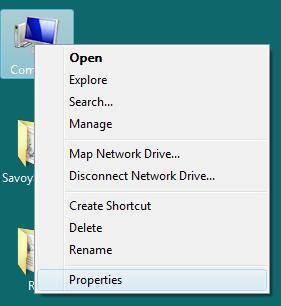
「Computer」(Windows XPでは「My Computer」)のアイコンを右クリックします。
ポップアップメニューから「Properties」をクリックします。
-
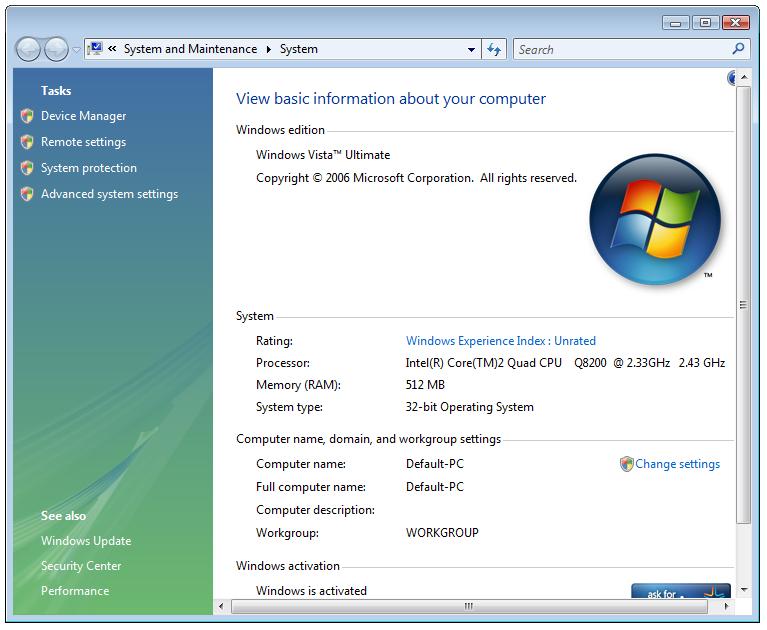
左のTasksペインに「Advanced system settings」という項目がありますので、これをクリックします。
-
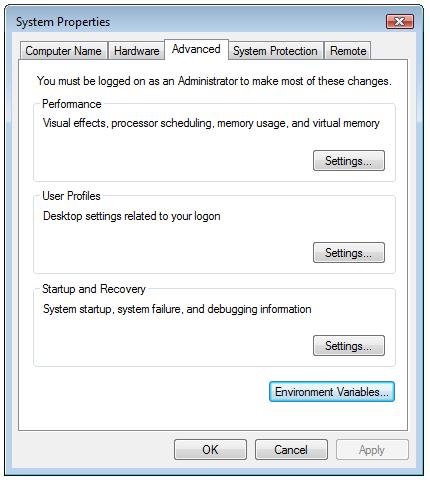
「Advanced」タブの一番下に「Environment Variables」というボタンがありますので、これをクリックします。
-
環境変数のダイアログボックスが開きますので、下段の「System variables」の一覧から「Path」を選択し、「Edit」ボタンをクリックします。
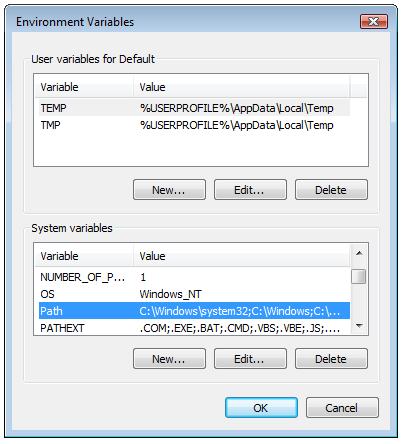
-
「Variable value」の一番最後にセミコロン「;」を入力し、「C:\Program Files\Jazz Soft\Bop」フォルダを追加します。
入力が完了したらOKボタンをクリックします。
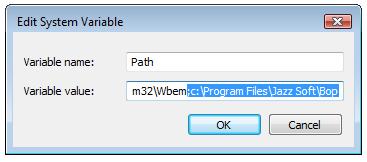
以上の手順で事前準備をしておくと、Explorerからバッチファイルをダブルクリックるだけで、データファイルが生成できるようになります。
|
|